
Number a selection in a controlled order.
MANAGER HUB
Marking
WHAT THE TOOL DOES
Number selected visible elements sequentially using a chosen parameter. Restrict the targets by category and filters, preview the order, then apply the numbering.
A CONCRETE USE CASE
A need. A clear workflow.
Filter targets, review the sequence, then apply the numbering.
KEY FEATURES
Targeted selection
Allowed categories, selection in the active view and parameter filters before generation.
Marking order
Sort elements by their position in the view to produce a logical sequence.
Values
Numeric or alphabetical starting values, zero padding, prefixes and suffixes, and composition from existing parameters.
Grouping
Group elements by parameter value and preview the sequence before writing.
Project numbers and units
Filters compare typed numeric values in project units. Integer numbering preserves its precision.
IN PRACTICE
From task to result.
Build the selection
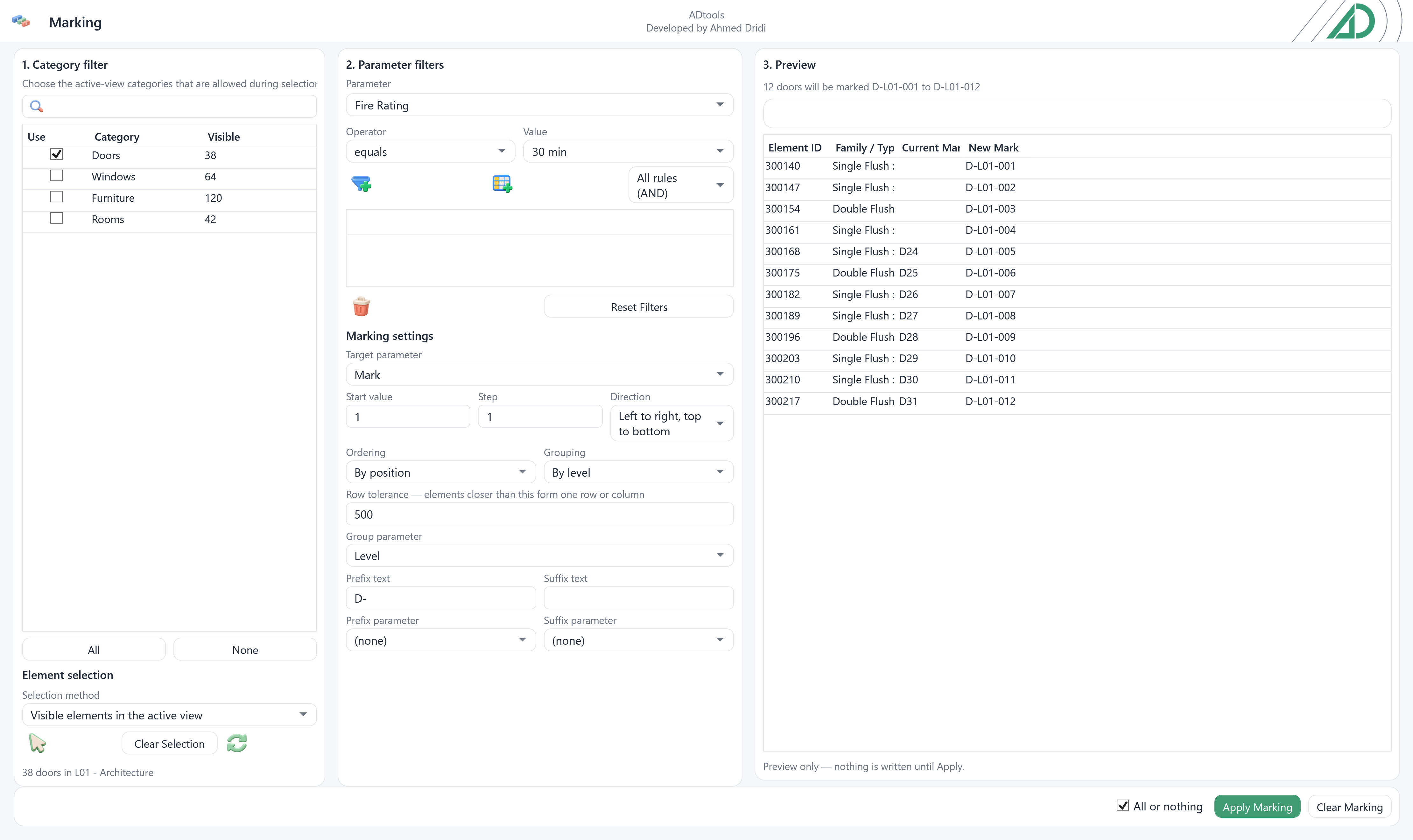
Limit allowed categories in the active view, select elements and refine the selection using parameters, operators and values. The preview table shows the retained elements.
Define the sequence
Choose the target parameter, starting value, increment, direction and order. Grouping, prefix and suffix options help create project-specific numbering.
Compare and apply
Refresh the preview to compare current and new values. Apply Marking writes the numbering; Clear Marking removes the targeted values.
A practical example
To mark a series of elements, start at 001, define the traversal order and add a prefix. Review the New column before changing model marks.
The tool in detail.
Illustrative example: the windows are populated with a fictional English-language Revit project, “Riverside Business Centre”.
ADTOOLS IN YOUR OFFICE
Request a demo See ADtools on your projects.
A video demo built around your own cases. Get in touch to set up a call.